



Local SEO for Small Businesses: The Complete Guide (and My 90-Day Plan)
By Kristian Kreaktive Last updated
How local SEO works for small businesses, a 90-day plan you can follow, what it costs, and how long it really takes. Real results, no promises.
TL;DR Too Long; Didn't Read
Local SEO gets your business in front of nearby customers through your Google Business Profile, reviews, listings, and local pages. Work in order: audit, fix the foundation, build local content, then earn reviews and links. Expect early movement in the first 30 days, with rankings and calls usually following in 60 to 90 days for a local business.

On this page
If someone nearby searches for what you sell and your business doesn’t show up, that customer calls someone else. Local SEO is how you fix that. Below, I walk through how Google picks local results, what to do first, what it costs, and how long it takes.
I’m Kristian. I’ve worked in digital marketing for 17 years, 15 of them running my own agency: KREAKTIVE, first in Spain and, since 2023, in Colorado Springs, where it operated as Digital Marketing Services until 2026. Below, I’ve laid that work out as a 90-day plan.
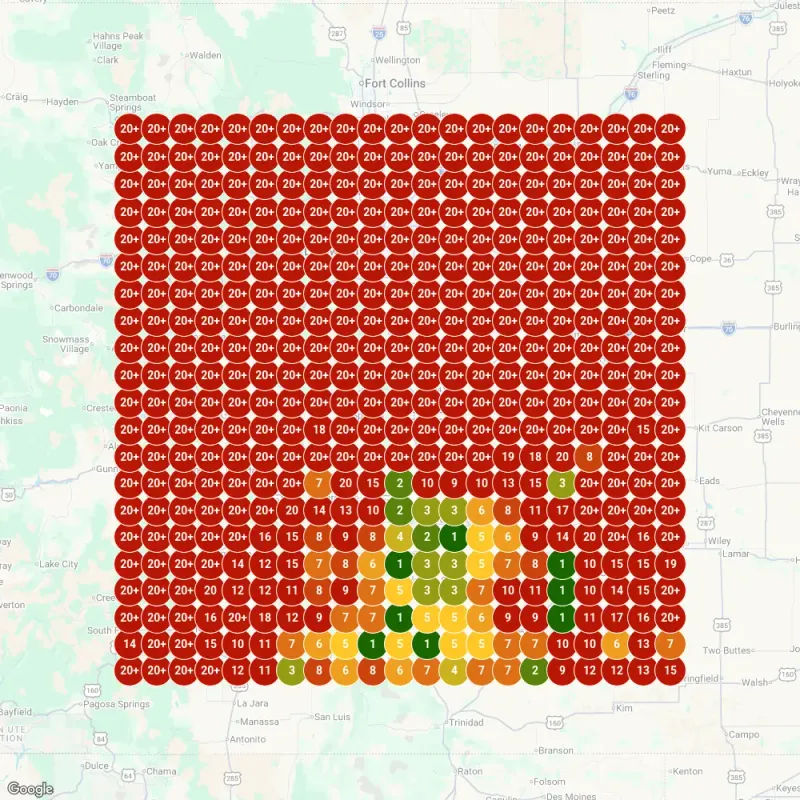
Two results show what it can look like. A wedding DJ in Pueblo went from position 20+ to #1 for ‘wedding DJ Pueblo’ across a 100-mile radius in 6 days, after I built a 47-page website on a $6,500 project. Sealwise Epoxy, a local epoxy company I did the brand, website, and local SEO for, booked $26,240 in new projects within 60 days of going live.
Those are past results, and they can’t guarantee yours. Every market is different, and I’ll be straight with you about timelines further down.
Free download: the 90-Day Local SEO Checklist
It follows this plan phase by phase, so you can tick off each step as you go.
What Local SEO Is (and How It’s Different From Regular SEO)
Local SEO is the work that gets your business found by people near you who are searching for what you do. Think “roof repair near me,” “dentist open Saturday,” or someone asking their phone for the closest tire shop. You want calls, direction requests, and booked jobs from people who can actually become customers. Traffic alone doesn’t pay the bills.
Regular SEO is about ranking your website for searches anywhere. Local SEO adds a second front: the Google map results, which lean heavily on your Google Business Profile, your reviews, and how close you are to the person searching. A blog post can rank in the regular results all day and never put your business on the map.
That’s why a business can have a decent website and still be invisible to the customer down the street. The map is a separate race with its own rules.
Most small businesses need both, just in a different order. If your customers come from your city or service area, local work comes first, because it reaches the people closest to buying. For the bigger picture of how search works for a small business, start with my SEO guide for small businesses, then come back here for the local layer.
The difference, side by side:
- Regular SEO: your website, your content, and links, competing for searches anywhere
- Local SEO: all of that, plus your Google Business Profile, reviews, listings, and location, competing for searches near you
How Google Decides Who Shows Up Locally
Google is unusually open about this one. Its own help page on local ranking says local results are mainly based on relevance, distance, and popularity. When the same page explains that third factor, it calls it prominence. Every step in this guide works on one of the three.
Relevance, Distance, and Prominence
Relevance is how well your Business Profile matches what someone is searching for. Your categories, your listed services, and the words on your website all feed it.
Distance is how far you are from the person searching. You can’t move your building, but you can make it very clear which areas you serve.
Prominence is how well-known your business is. Google names the links pointing to your business and the number of reviews you have as part of it, and says more reviews and positive ratings can help your local ranking. A clear, consistent brand makes every one of those signals easier to earn.
Google also says there’s no way to request or pay for a better local ranking. Anyone selling you a paid shortcut into the map is selling something Google says doesn’t exist.
A widely cited outside view is Whitespark’s Local Search Ranking Factors survey, where local SEO practitioners estimate how much each group of signals weighs. The 2026 edition puts Google Business Profile signals at about 32% of map pack ranking and reviews at about 20%, with reviews gaining weight. That’s expert opinion, not Google data. It does match what I see in client accounts, where the profile and the reviews do most of the work in the map.
The Three Places You Can Show Up
When someone searches for a local service, there are three places your business can appear:
- The map pack: the short list of businesses next to a map, driven mostly by your profile, reviews, and distance
- Regular results: the links below the map, driven by your website’s content, links, and technical health
- AI answers: the AI-written summaries Google shows on some searches, plus tools like ChatGPT that people now ask for recommendations
Each one rewards slightly different work, and the 90-day plan below covers all three. All three also depend on whether Google sees your business as trustworthy. I explain how Google judges trust in a separate guide.
Phase 1 (Weeks 1-2): Audit Where You Stand
Before you change anything, write down where you are. Without a baseline, you’ll never know which work paid off. Take screenshots of your profile, your reviews, and where you rank today, because in three months those screenshots are how you’ll see what changed.
Check these five areas and note what you find:
- Google Business Profile: Is it claimed and verified? Are categories, hours, services, and the description filled in? When did you last post or add photos?
- Website: Does it load quickly on a phone? Are your name, address, and phone number on every page? Does each main service have its own page?
- Listings: Search your business name in quotes. Is your name, address, and phone number written the same way everywhere?
- Reviews: How many do you have, what’s your average, how many came in over the last 90 days, and have you replied to them?
- Rankings: Search your top five services from where your customers are. Are you in the map, below it, or nowhere?
Then look at the three competitors that show up in the map for your main service. Count their reviews, note their categories, and look at their websites. Look for what they have that you’re missing, and for anything they all ignore.
Sort everything you find into three piles. “Fix today” is the ten-minute stuff, like a wrong phone number or missing hours. “Fix this month” is listing cleanup and missing pages, and “build over time” is reviews, content, and links.
Fix-today items are the fastest wins in this whole guide, so do them first. Most businesses I audit have a handful sitting in plain sight.
For tools, I use Local Falcon to see where a business ranks across a grid of points around it, Semrush and Ahrefs for keywords and competitors, and Screaming Frog for technical crawls. You don’t need any of that to start. Google Search Console and your Business Profile’s own performance report are free and cover the basics.
Phase 2 (Weeks 3-4): Lock Down the Foundation
Everything after this phase depends on it. If your profile, listings, and site basics are off, content and links won’t save you.
Google Business Profile
Your profile is the biggest lever in local SEO, and it carries the most weight of any signal group in the Whitespark survey. I cover every field in my Google Business Profile optimization guide, but these are the ones that matter most:
- Business name: your real-world name, exactly as customers see it on your sign and website
- Primary category: the narrowest one that fits your main service (“personal injury attorney” beats “lawyer”)
- Secondary categories: only the ones that match services you really offer
- Services and description: every service in plain words, written for a customer, not for Google
- Photos: your real work, team, vehicles, and location, never stock images
- Hours: regular hours plus holiday hours, set before every holiday
Don’t add keywords to your business name. Google’s guidelines say extra information in the name could get your profile suspended. Wrong hours cost more than rankings: a customer who drives over to a locked door doesn’t give you a second chance. Choosing categories is where most profiles go wrong, so my guide to GBP categories walks through it.
Then keep the profile active with Google Posts. Update posts don’t disappear after a week, a myth that still gets repeated. Google’s help page says posts older than 6 months are archived unless you set a date range. Posting weekly or every other week is a good pace, because a fresh profile tells customers you’re open and busy.
NAP and Citations
NAP means your business name, address, and phone number. A citation is any listing that shows them, like Yelp, Facebook, Apple Maps, or an industry directory. Your NAP needs to be identical everywhere, because “123 Main St” and “123 Main Street, Suite B” can look like different businesses to a directory database.
Make a one-page master document with your exact name, address, phone format, and website address, and copy from it every time you create or fix a listing. Then work through the important listings first: Google, Apple Maps, Bing Places, Facebook, Yelp, the Better Business Bureau, your chamber of commerce, and the main directories for your industry.
Create each listing under a login you control, rather than paying a service to hold them for you. If you ever stop paying, the listings should still be yours.
Fix the wrong listings before you add new ones. My local citation building guide has the full process.
Schema Markup
Schema markup is code on your website that tells search engines exactly what your business is, where it is, and when it’s open. For a local business that means LocalBusiness schema (or a more specific type, like Plumber or Dentist) with your name, address, phone, hours, service area, and map coordinates.
One correction to advice you’ll see elsewhere: putting your own reviews into that schema won’t earn you gold stars in Google. Google’s review snippet rules say that when a business controls the reviews about itself, its LocalBusiness or Organization markup is not eligible for the star review feature. Use schema to describe the business accurately, and let your reviews live on your Google profile. The free Schema Markup Validator at validator.schema.org will tell you whether the code is set up correctly.
Technical Basics
Your website has to work for someone standing in a parking lot with one bar of signal. Check these:
- Pages load quickly on a phone
- The phone number is tap-to-call and easy to find
- The site runs on HTTPS
- Every main service has its own page
Google’s free PageSpeed Insights tool shows the worst problems in about a minute. For the deeper fixes, see my technical SEO guide for business owners.
Phase 3 (Month 2): Build Local Content
With the foundation in place, you can start creating pages that match how local customers search.
Local Keyword Research
Start with two lists: every service you sell, and every town or neighborhood you serve. Then combine them the way people actually search:
- Service + city: “roof repair Aurora”
- Service + neighborhood: “plumber Capitol Hill”
- Service + “near me”: “emergency dentist near me”
- Problem + city: “basement leaking Lakewood”
Don’t guess which ones matter. A keyword tool shows which combinations people search, and Search Console shows which ones you already appear for. Then give each keyword group one page, so two of your own pages never compete for the same search. My keyword research guide for small businesses covers the process step by step.
Location Pages That Earn Their Place
If you serve more than one area, location pages are how you show up in each of them. But a page that only swaps the city name is close to worthless, both to Google and to the customer reading it.
A good location page answers one question: “Do they really work here?” It shows jobs you’ve done in that area, the neighborhoods you cover, local details that affect the work, and reviews from customers there. If you can’t write something true and specific about a place, you probably shouldn’t have a page for it yet.
Start with the three to five areas that already bring in most of your work. Write those pages well, see which ones start pulling calls, then expand. A roofer’s page for a hail-prone suburb should talk about hail claims and the roofs in that area, not repeat the homepage with a new city name.
The wedding DJ project is my clearest example. I built a 47-page website for a DJ based in Pueblo, including 16 location pages and 10 blog posts. In 6 days, the business went from position 20+ to #1 for ‘wedding DJ Pueblo’ across a 100-mile radius.
That’s not a typical timeline, and I won’t promise it to anyone. It does show what happens when each page has a real reason to exist. Read the full wedding DJ case study.
Local Content Beyond Location Pages
Location pages catch people who are ready to hire. Blog posts catch them a step earlier, while they’re still figuring out the problem. The strongest local topics come straight from the questions people ask you on the phone:
- “How much does [service] cost in [city]?”
- “Do I need a permit for [project] in [county]?”
- “[Option A] or [option B]: which one fits my situation?”
- Seasonal problems your area actually has
Each post should answer one question well and link to the service page that solves it.
Phase 4 (Months 2-3): Build Local Authority
Content tells Google what you do. Authority tells it people trust you. This phase is mostly reviews and links, and it never really ends.
A Review System That Runs Every Week
Reviews are the second-heaviest signal group in the Whitespark survey, and they’re what customers read before they call. Businesses with a steady flow of reviews get it by asking every customer, every time, with a direct link.
How many do you need? There’s no magic number. Look at the businesses in your map pack, aim to close the gap, then keep a steady pace. These are the monthly targets I work toward with clients. They’re my working numbers, not Google rules:
- Small businesses with 1 or 2 locations: 5 to 10 new reviews a month
- Service businesses: 8 to 15 a month
- High-volume retail and restaurants: 15 to 30 or more a month
Pace matters because a profile that got a burst of reviews years ago and none since looks less alive than one getting a few every week. Review generation was part of the plan for a bathroom remodeler I worked with in 2024. Their review count grew from 12 to 47, and they moved from #13 to #2 on Google Maps.
The ask itself should be simple:
- A text or email soon after the job, while it’s fresh, with a direct link to your Google review form
- A QR code card handed over at the end of the visit
- A short line you and your team say in person
Stay inside Google’s rules. Its review policy bans offering discounts, free goods, or payment in exchange for reviews, and bans asking only happy customers. It also says businesses shouldn’t request specific content, so don’t script what customers write, and that includes asking them to mention your city.
If you want the texting part automated, I use MoreStars, a tool that sends review requests by text. Disclosure: MoreStars is my own product, so weigh my opinion with that in mind. Any tool that sends a direct review link to every customer will do the job.
Responding to Reviews
Reply to every review, good and bad, within 48 hours. A short, specific thank-you on the good ones shows you’re paying attention.
On the bad ones, stay calm, own what’s yours, and offer to sort it out offline. People read your reply as closely as the review.
Never buy reviews or post fake ones. It breaks Google’s policy, and getting caught can cost you far more than those reviews were ever worth.
Local Links
Links from your own community count for more than piles of directory links. The easiest ones to start with:
- Sponsorships of local teams, events, and charities
- Your chamber of commerce and trade associations
- Suppliers, partners, and property managers who list their contractors
- Local news sites and blogs, when you have a story or an expert view to offer
In my experience, one link from your local paper is worth more than dozens from random directories. My link building guide for small businesses has more ways to earn them.
Phase 5 (Month 3 and Beyond): Advanced Moves
Once the basics run on their own, these four areas are where businesses pull ahead.
Service-Area Businesses
Plumbers, cleaners, mobile mechanics, and many contractors serve customers at the customer’s address. If that’s you, Google’s guidelines say you should hide your business address from customers and list the areas you serve instead.
Without a pin on the map in every town, your service-area pages, listings, and reviews have to prove you work there. Treat each service-area page like a location page: real jobs, real neighborhoods, real reviews.
Multiple Locations
Each physical location needs its own Google Business Profile, its own listings, its own page on your website, and its own flow of reviews. The hard part is making each location page different, with that branch’s team, hours, and local jobs, without losing your brand voice.
Keep it to one website with one page per location, and link each Google profile to its own page, not to your homepage. That tells Google and customers which branch is which.
AI Search
Google now shows AI-written answers on some searches, and more customers ask ChatGPT and similar tools who to hire. I don’t trust any single number for how often AI answers show up on local searches, because the feature keeps changing.
On my side, I keep the business facts identical everywhere, keep the profile complete, and write service pages and FAQs that give a direct answer in the first sentence. Once a quarter, ask ChatGPT and Google’s AI what they say about your business. If a fact is wrong, fix it at the source: your profile, your website, and your main listings.
If you want that work done on purpose rather than by accident, that’s what my AI optimization service is for.
Reporting Spam
Some competitors cheat with keyword-stuffed business names, fake addresses, or fake reviews. You can push back.
Use “Suggest an edit” on their profile, or for misleading names, phone numbers, or web addresses, Google’s Business Redressal Complaint Form. Report facts, keep screenshots, and be patient, because Google doesn’t always act fast. Only report real violations. A competitor outranking you isn’t spam, and it’s usually a sign of what you need to work on.
How to Measure Local SEO (Calls, Not Rankings)
Rankings only matter when they bring in business. Watch the numbers that turn into money:
- Phone calls from your profile and your website
- Form submissions and booking requests
- Direction requests from your Google profile
- Revenue from customers who found you through search
Your Business Profile’s performance report shows calls, direction requests, and website clicks for free. Add call tracking on your website so you know which pages produce calls, and tag your forms so you know where leads came from. If you use a CRM, connect each lead to the job it turned into.
One warning about rankings: map results change depending on where the searcher is standing. Checking from your own office tells you very little about a customer across town, which is why I map where you rank across your whole service area, not from one spot.
Check rankings and reviews every month, but judge the work on calls and revenue. Once you can trace a booked job back to a search, you’ll know exactly what local SEO is worth to you.
What Local SEO Costs and How Long It Takes
Local SEO prices vary a lot, and the number on a quote tells you less than what’s behind it. Some plans cover directory listings and a monthly report. Others build new pages, publish content, and track your calls every month. Compare what each plan actually ships, not just the price.
What I charge. My local SEO starts at $1,500 a month with my Search Visibility plan. It includes Google Business Profile work, site improvements, and 4 articles or local pages a month. Search Visibility Pro is $2,800 a month with 12, for markets where competitors are already doing SEO. There’s a 3-month minimum, because Google takes time to rank a site, then it runs month-to-month. Before you pay me a cent, I put in writing exactly what I’ll ship in the first 30 days. If I don’t ship every item on that list, I refund the first month’s fee.
For context. Ahrefs surveyed 439 SEO providers in 2023 and found local SEO averaged $1,557 a month, with prices moving based on competition and how much content each plan includes.
Whoever you hire, ask three questions before you sign. What exactly will you ship in the first month? Who does the work? How will you show me calls and leads, not just rankings? A provider who can’t answer all three in writing isn’t ready for your money.
My local SEO packages guide explains what to look for in any provider’s package, and my pricing page has the details.
How long it takes. In the first 30 days, I expect your profile fully built out, the pages live, tracking in place, and the first movement in impressions and map views. Rankings and calls follow that, usually 60 to 90 days for a local business. Competitive markets take longer, and nobody controls Google’s clock. Anyone who guarantees you page one in 30 days is guessing with your money.
Local SEO by Industry
The plan above works for every local business, but the emphasis shifts by industry.
Home services like plumbing, HVAC, roofing, and remodeling are usually service-area businesses, so service-area pages and reviews carry extra weight. Emergency searches tend to turn into calls fast, and before-and-after photos of real jobs do a lot of the selling. My home services marketing guide goes deeper.
Healthcare and dental practices have to be careful about patient privacy, including in review replies. Pages for each provider tend to help. See my guide to HIPAA-compliant healthcare SEO.
Restaurants win on photos, a current menu, hours that are always right, and a steady stream of reviews. Link your menu and reservation page from your profile so people can act without hunting.
Professional services like law and accounting win on depth: clear practice-area pages, bios that show each person’s credentials, and content that shows real expertise. People are trusting you with money or legal trouble, so proof of who you are matters as much as rankings.
The Mistakes I See Most
After 17 years, I keep seeing the same mistakes:
- Stuffing keywords into the Google Business Profile name
- Location pages that only swap the city name
- Different versions of the business name, address, or phone number across the web
- Asking only happy customers for reviews, or telling customers what to write
- Ignoring negative reviews
- A website that’s hard to use on a phone
- Changing your phone number or address without updating every listing
- Chasing rankings for searches that don’t bring paying jobs
- Treating local SEO as a one-time project
None of these are hard to fix. Most of them come from rushing, so take the phases in order.
Your 90-Day Local SEO Roadmap
The whole plan on one page:
- Weeks 1-2, audit: record your baseline, fix the quick wins, and study the three competitors in your map pack
- Weeks 3-4, foundation: complete your Google Business Profile, fix your top listings, add schema, and fix mobile and speed problems
- Month 2, content: publish your first location pages and local posts, start your review system, and post on your profile regularly
- Months 2-3, authority: keep reviews coming, reply to every one, and aim to earn 3 to 5 local links
- Month 3 and beyond: service-area or multi-location work, AI search, and spam reports, plus a monthly look at calls and revenue
Local SEO rewards steady work more than bursts. The businesses that win keep their information right, earn real reviews, and publish pages that help people decide.
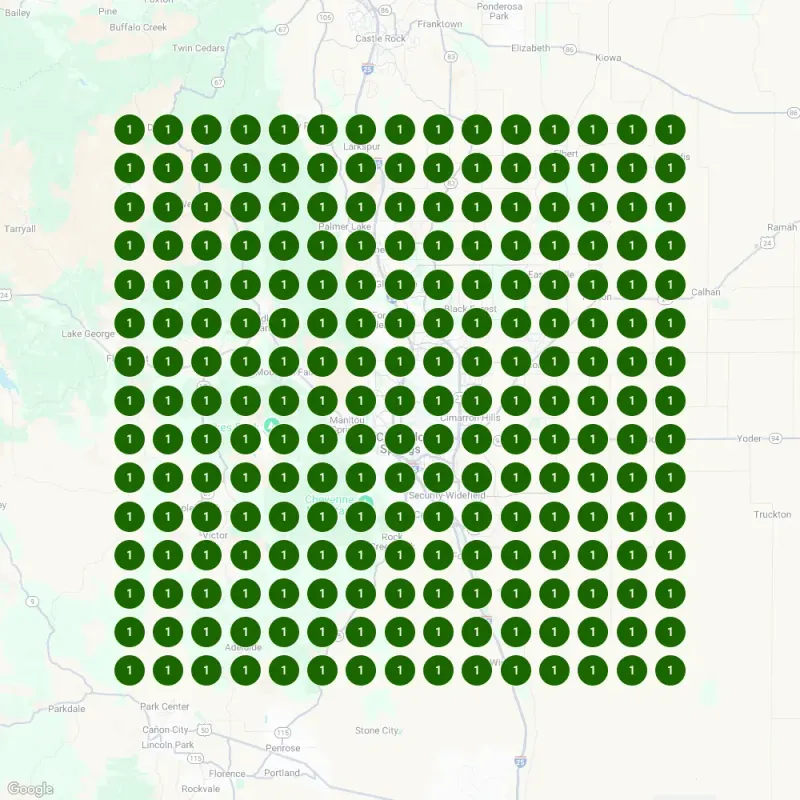
If you’d rather have someone run this for you, that’s what my local SEO service does, as part of my wider SEO work. The Sealwise project shows what local SEO for Colorado Springs businesses can look like: $26,240 in new projects within 60 days of going live. In a January 2025 GeoGrid scan, Sealwise ranked #1 on Google Maps for “epoxy garage floor” across a 25-mile radius. Read the Sealwise case study.
To compare plans first, see my monthly SEO packages. Or get in touch: tell me about your business, and I’ll tell you honestly whether I can help.
Frequently Asked Questions
It depends on what's included, so compare what each quote actually ships. Some plans cover listings and a monthly report; others build new pages and content every month. My Search Visibility plan is $1,500 a month and includes Google Business Profile work, site improvements, and 4 articles or local pages a month; Search Visibility Pro is $2,800 a month with 12. There's a 3-month minimum, because Google takes time to rank a site, then it runs month-to-month, and before you pay a cent, I put in writing exactly what I'll ship in the first 30 days.
For a local business, rankings and calls usually follow in 60 to 90 days. In the first 30 days, expect the profile built out, the pages live, tracking in place, and early movement in impressions and map views. Competitive markets take longer.
Regular SEO competes for searches anywhere; local SEO competes for searches near you. Local adds your Google Business Profile, reviews, listings, and distance to the usual website work. If your customers come from your city or service area, local comes first.
There's no magic number. Aim to close the gap with the businesses already in your map pack, then keep a steady pace. My working targets are 5 to 10 new reviews a month for a small business with 1 or 2 locations, 8 to 15 for service businesses, and 15 to 30 or more for high-volume retail and restaurants. Those are my numbers, not Google's rules. Ask every customer, never pay for reviews, and never ask only the happy ones.
Yes, you can handle the foundation on your own. Claiming and completing your Google Business Profile, fixing your listings, and asking for reviews take time, not technical skill. Most owners hit a wall at content, technical fixes, and links. If you have a few hours a month, start with the first two phases of this guide.
Yes. Service-area businesses can show up in the map too. Google's guidelines say to hide your business address and list the areas you serve instead. Service-area pages, consistent listings, and reviews then do the work of proving you serve each area.
You can get some visibility from a Google Business Profile alone, but a website makes local SEO much stronger. It gives you service and location pages that can rank in the regular results, a place for schema and call tracking, and somewhere to send people who want more than a phone number.
They add a third place to show up, next to the map and the regular results. I don't trust any single number yet for how often AI answers appear on local searches, because the feature keeps changing. The work that helps is the same work in this guide: a complete profile, identical business facts everywhere, real reviews, and pages that answer questions directly.
Sources & References (7)
- Google Business Profile Help: Tips to improve your local ranking on Google
- Google Business Profile Help: Guidelines for representing your business on Google
- Google Business Profile Help: About posts
- Google Search Central: Review snippet structured data
- Google Maps: Prohibited and restricted content
- Whitespark: Local Search Ranking Factors 2026
- Ahrefs: SEO pricing survey